
diff options
Diffstat (limited to 'README.md')
| -rw-r--r-- | README.md | 385 |
1 files changed, 57 insertions, 328 deletions
@@ -3,9 +3,9 @@ # Abridge Zola Theme -Abridge is a fast and lightweight Zola theme using semantic html, only ~6kb css before the svg icons and syntax highlighting css, no mandatory JS[*](https://github.com/Jieiku/abridge#contributing-and-philosophy), and perfect [Lighthouse](https://pagespeed.web.dev/report?url=abridge.netlify.app), [YellowLabTools](https://yellowlab.tools/), and [Observatory](https://observatory.mozilla.org/analyze/abridge.netlify.app) scores. +A fast, lightweight, and modern [Zola](https://getzola.org) theme utilizing [abridge.css](https://github.com/Jieiku/abridge.css) (a class-light semantic HTML CSS Framework). Perfect [Lighthouse](https://pagespeed.web.dev/report?url=abridge.netlify.app), [YellowLabTools](https://yellowlab.tools/), and [Observatory](https://observatory.mozilla.org/analyze/abridge.netlify.app) scores. Here is a [Zola Themes Benchmarks](https://github.com/Jieiku/zola-themes-benchmarks/blob/main/README.md) Page. -Here is a [Zola Themes Benchmarks](https://github.com/Jieiku/zola-themes-benchmarks/blob/main/README.md) Page. +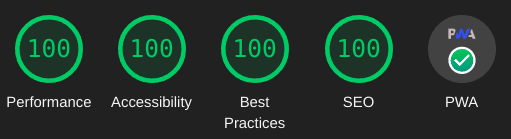 Maintenance of this project is made possible by all the <a href="https://github.com/Jieiku/abridge/graphs/contributors">contributors</a> and <a href="https://github.com/sponsors/Jieiku">sponsors</a>. If you'd like to sponsor this project and have your avatar or company logo appear below <a href="https://github.com/sponsors/Jieiku">click here</a>. 💖 @@ -13,19 +13,47 @@ Maintenance of this project is made possible by all the <a href="https://github. --- -**[View Abridge demo](https://abridge.netlify.app/)** +**[View Abridge demo](https://abridge.netlify.app/overview-abridge/)** -**[View Abridge.css demo](https://abridgecss.netlify.app/)** [[abridge.css framework](https://github.com/Jieiku/abridge.css/tree/master/dist)] +**[View Abridge.css demo](https://abridgecss.netlify.app/overview-abridge/)** [[abridge.css framework](https://github.com/Jieiku/abridge.css/tree/master/dist)] The Abridge.css demo is simply using Abridge theme as a submodule: [config.toml](https://github.com/Jieiku/abridge.css/blob/master/config.toml), [sass/abridge.scss](https://github.com/Jieiku/abridge.css/blob/master/sass/abridge.scss) </div> -## Requirements +## Features -This theme requires version 0.17.3 or later of [Zola](https://www.getzola.org/documentation/getting-started/installation/) +- [X] Perfect [Lighthouse](https://pagespeed.web.dev/report?url=abridge.netlify.app), [YellowLabTools](https://yellowlab.tools/), and [Observatory](https://observatory.mozilla.org/analyze/abridge.netlify.app) scores. +- [X] [PWA support](#pwa-progressive-web-app) (Progressive Web Application). +- [X] All JavaScript can be [fully disabled](https://abridge.netlify.app/overview-abridge/#javascript-files). +- [X] Dark, Light, Auto, and Switcher themes. (colors can be customized, css variables) +- [X] Code [syntax highlighting](https://abridge.netlify.app/overview-code-blocks/). (colors can be customized, css variables) +- [X] Numbered code blocks with [line highlighting](https://abridge.netlify.app/overview-code-blocks/#toml). +- [X] Multi-language support. +- [X] Search support. (elasticlunr, tinysearch, stork) +- [X] Search Suggestions navigation keys, `/` focus, `arrow` move, `enter` select, `escape` close. +- [X] Search Results Page, type search query then hit `Enter Key` or `click` the search button icon. +- [X] [SEO](#seo-and-header-tags) support. (Search Engine Optimization) +- [X] [Pagination](#pagination) with numbered paginator on index. +- [X] Title Based Previous and Next Article links at bottom of Article. +- [X] Table of Contents in page Index (Optional, clickable links) +- [X] Recent Posts Block. (Optional) +- [X] Back to Top button. (uses css only) +- [X] Code Blocks copy button. +- [X] Email link in footer obfuscation. (anti-spam) +- [X] [KaTeX](https://katex.org/) support. +- [X] [Archive page](https://abridge.netlify.app/archive/). +- [x] [Tags](https://abridge.netlify.app/tags/). +- [x] Categories. (similar to Tags, disabled/commented out by default) +- [x] Social icon links in footer. +- [X] Responsive design. (mobile first) +- [X] Video Shortcodes: [Youtube](https://abridge.netlify.app/overview-embed-youtube/), [Vimeo](https://abridge.netlify.app/overview-embed-vimeo/), [Streamable](https://abridge.netlify.app/overview-embed-streamable/). +- [X] Media Shortcodes: [video](https://abridge.netlify.app/overview-rich-content/#video), [img](https://abridge.netlify.app/overview-images/#img-shortcode), [imgswap](https://abridge.netlify.app/overview-images/#imgswap-shortcode), [image](https://abridge.netlify.app/overview-rich-content/#image), [gif](https://abridge.netlify.app/overview-rich-content/#gif), [audio](https://abridge.netlify.app/overview-rich-content/#audio). +- [X] Other Shortcodes: [showdata](https://abridge.netlify.app/overview-showdata/), [katex](https://abridge.netlify.app/overview-math/#usage-1). ## Quick Start +This theme requires version 0.17.2 or later of [Zola](https://www.getzola.org/documentation/getting-started/installation/) + ```bash git clone https://github.com/jieiku/abridge.git cd abridge @@ -34,38 +62,39 @@ zola serve ``` ## Installation -The Quick Start shows how to run the theme directly. -Next we will use abridge as a theme to a NEW site. -### Step 1: Create a new zola site +The Quick Start shows how to run the theme directly. Next we will use abridge as a theme to a NEW site. + +### 1: Create a new zola site ```bash zola init mysite cd mysite ``` -### Step 2: Install abridge +### 2: Install Abridge -Download this theme to your themes directory: +Add the theme as a git submodule: ```bash -git clone https://github.com/jieiku/abridge.git themes/abridge +git init # if your project is a git repository already, ignore this command +git submodule add https://github.com/jieiku/abridge.git themes/abridge ``` -Or install as a submodule: +Or clone the theme into your themes directory: ```bash -git init # if your project is a git repository already, ignore this command -git submodule add https://github.com/jieiku/abridge.git themes/abridge +git clone https://github.com/jieiku/abridge.git themes/abridge ``` -### Step 3: Configuration +### 3: Configuration Copy some files from the theme directory to your project's root directory: ```bash touch templates/.gitkeep rsync themes/abridge/config.toml config.toml +rsync themes/abridge/content/_index.md content/ rsync themes/abridge/COPY-TO-ROOT-SASS/* sass/ rsync themes/abridge/netlify.toml netlify.toml rsync themes/abridge/package.json package.json @@ -73,18 +102,20 @@ rsync -r themes/abridge/content/static content/ ``` - `templates/.gitkeep` the templates directory is required in your base site. [#2150](https://github.com/getzola/zola/issues/2150) -- `config.toml` base configuration with all config values +- `config.toml` base configuration with all config values. +- `content/_index.md` required to set pagination. - `COPY-TO-ROOT-SASS/abridge.scss` overrides to customize Abridge variables. -- `netlify.toml` settings to deploy your repo with netlfiy +- `netlify.toml` settings to deploy your repo with netlfiy. - `package.json` to switch between nosearch, elasticlunr, tinysearch, stork. - `content/static` files for generating tinysearch and stork indexes. Uncomment the theme line in your project's root config.toml: + ```bash sed -i 's/^#theme = "abridge"/theme = "abridge"/' config.toml ``` -### Step 4: Add new content +### 4: Add new content Copy the content from the theme directory to your project or make a new post: @@ -92,7 +123,7 @@ Copy the content from the theme directory to your project or make a new post: rsync -r themes/abridge/content . ``` -### Step 5: Run the project +### 5: Run the project Just run `zola serve` in the root path of the project: @@ -102,326 +133,24 @@ zola serve Zola will start the dev web server, accessible by default at `http://127.0.0.1:1111`. -Saved changes will live reload in the browser. +Saved changes will live reload in the browser. (press `ctrl+f5`, or while developing set `pwa=false` in `config.toml`) ## Customization -A lot of effort has been made to ensure Abridge features can be easily customized. - -### Default Theme for nojs/noscript visitors. - -If you have abridge configured to use the switcher mode instead of auto/dark/light, then your site will have a button that allows the visitor to toggle the theme. - -If your visitor uses noscript or some other javascript blocking browser addon, then they will be stuck with whatever the configured default theme is for the switcher mode. - -To adjust this mode you would set the following two config values in abridge.scss **AND** config.toml: - -```scss -$switcherDefault: "dark",// default nojs switcher mode: dark, light (make sure to also set js_switcher_default in config.toml) -``` - -```toml -js_switcher_default = "dark" # default nojs switcher mode: dark, light (make sure to also set $switcherDefault in abridge.scss) -``` - -By default abridge uses dark mode for the switcher, so unless you want to set the default mode to light for nojs visitors, then you do not need to worry about these settings. - -### Number of Items per page for pagination - -To change the number of items per page edit: `content/_index.md` and change the value for `paginate_by` - -## Sass Overrides - -Abridge SASS variables can be overrided by editing `sass\abridge.scss` file in your project's root sass folder. - -### Page Width: - -```scss -$mw:75%,// max-width -``` - -### Abridge Theme Modes - -```scss -$abridgeMode: "switcher",//valid values: switcher, auto, dark, light -``` - -- Switcher automatically displays a dark or light version depending on browser/OS settings, and has a javascript user clickable theme switcher. -- Auto automatically displays a dark or light version depending on browser/OS settings. -- Dark is the dark theme always. -- Light is the light theme always. - -### Colors and Styles - -You can specify which color template you want to use as a base: -```scss -$color: "orange",// color template to use/override: orange, blue, blueshade -``` - -Then override individual colors as needed: -```scss -/// Dark Colors -$f1d: #ccc,// Font Color Primary -$f2d: #ddd,// Font Color Headers -$c1d: #111,// Background Color Primary -$c2d: #222,// Background Color Secondary -... -``` - -### Footer Social Icons - -You should configure which social icons you plan to use. (makes the css file size smaller) - -To simply turn them all off you can set `$enable-icons: false` - -Otherwise enable only the icons you need, eg for mail you would set `$icon-mail: true` - -You should then disable all the icons that you do not use. - -## Config.toml Configuration - -Most Options in config.toml are self documenting. (obvious between name of config value and comments) - -Abridge will work with a barebones config.toml because default values are provided in the template files. - -I recommend copying the entire config.toml file as outlined in Step 3 as it provides all configurable values. - -### Top and Footer menus - -Set a field in `extra` with a key of `menu` and `menu_footer`. -If you want the link to open in a new tab/browser then set `blank = true`. -If a link should have a trailing slash at the end of the url set `slash = true`. -(generally all links should have a trailing slash unless its a file link such as sitemap.xml) - -```toml -menu = [ - {url = "about", name = "About", slash = true, blank = false}, - {url = "posts", name = "Posts", slash = true, blank = false}, - {url = "categories", name = "Categories", slash = true, blank = false}, - {url = "tags", name = "Tags", slash = true, blank = false}, -] -menu_footer = [ - {url = "about", name = "About", slash = true, blank = false}, - {url = "contact", name = "Contact", slash = true, blank = false}, - {url = "privacy", name = "Privacy", slash = true, blank = false}, - {url = "sitemap.xml", name = "Sitemap", slash = false, blank = true}, -] -``` - -### SEO and Header Tags - -You can review the SEO tags in the head macro located at `templates/macros/head.html`, all configurable values should be in config.toml under config.extra or in the content markdown files. - -In your post markdown file you should set a title less than 60 characters and a description between 80 and 160 characters in length. The description is what is displayed in search results below the page title. Anywhere that you do not set a page description, the primary site config.description will be used instead. - -You should also set page specific keywords unless your keywords defined in config.toml suffice, any keywords that you add to the page are in addition to the ones defined in config.toml, so do not add those same keywords to your page keywords. - -You can optionally also set a page specific image for search results by using page.extra.thumbnail. OpenGraph recommends 1200 x 630 (1.9:1). Twitter recommends 2:1 for large and 1:1 for small. If you do not set a page specific thumbnail then the banner defined in config.toml will be used instead. - -Refer to [overview-images](https://raw.githubusercontent.com/Jieiku/abridge/master/content/overview-images/index.md) for an example: -```md -+++ -title = "Image Shortcodes" -description = "Images can be embedded directly using markdown ``, but using a shortcode prevents CLS by explicitly setting the width and height." -date = 2021-05-19 - -[taxonomies] -categories = ["Features"] -tags = ["shortcodes","images"] -[extra] -toc = true -keywords = "Image, Markdown, Shortcodes, Hover" -thumbnail = "ferris-gesture.png" -+++ -``` - -### KaTeX Math Notation - -KaTeX can be used to display complex mathematics, it is a "Fast math typesetting for the web." - -You can see a demo on [this page](https://abridge.netlify.app/overview-math/). - -For better performance I recommend only enabling math on a [per page bases in your post.md files](https://github.com/Jieiku/abridge/blob/master/content/overview-math.md?plain=1#L11-L13), instead of in your main config.toml file. - -### PWA (Progressive Web Application) - -Abridge theme has PWA support. You can install the entire site as an app and have it work offline. To try it out simply use google chrome or your phone and go here: https://abridge.netlify.app/ - -If using chrome on desktop then look at the end of the address bar for the install button. On android you should get a popup to install, you can also install from the 3 dot menu in the top right corner. Once you have the PWA installed, you can go completely offline and you will still be able to browse or search the site! - -To use it in your own instance you will need to edit `static/sw.js` for the list of files to cache. Technically you do not need to edit `sw.js`, but if even a single file in the cache list is missing then it wont pre cache the list, so it will only cache as you browse. - -There is an npm script to generate the file cache list and minification `npm run pwa`. My `netlify.toml` file automatically runs this npm script during site deployment, so everything is automatic. If Zola was able to template a js file then it might be possible to generate the list of cache files dynamically at build. - -The PWA feature is also easy to disable by simply setting `pwa = false` in `config.toml` - -## Javascript files - -These are the javascript files currently used by Abridge: - -- search_index.en.js: search index generated by zola at each build for elasticlunr. -- elasticlunr.min.js: search library for client side searching. -- search.js: to make use of elasticlunr from our sites search box for both suggestions and the results page. -- email.js: uses javascript to obfuscate your real email address for the mail icon at the bottom of the page. -- codecopy.js: add a Copy Button to code blocks, to copy contents of the code block to clipboard. -- theme.js: tiny script to facilitate local storage for the theme switcher. (never bundle, always separate) -- theme_button.js: tiny script for the theme switcher function when you click the theme switch button. -- prestyle.js: Used to preload css files `<link rel="preload"` - this script changes these to `<link rel="stylesheet"` once the page has finished loading, this allows us to load stylesheets for external fonts, fontawesome, or katex in a non blocking fashion. -- sw.js: this is the Service Worker file for the PWA. -- sw_load.js: this file handles loading the Service Worker for the PWA. - -### js_bundle option - -`js_bundle` when set to true serves a bundle file instead of all of the individual js files. - -All Bundles are defined in [package.json](https://github.com/Jieiku/abridge/blob/master/package.json) - -A Bundle can be generated from the package.json scripts using npm: - -- `npm run abridge-bundle-nosearch` - generates a bundle without search. -- `npm run abridge-bundle-elasticlunr` - generates a bundle of all js with elasticlunr. -- `npm run abridge-bundle-tinysearch` - generates a bundle of all js with tinysearch. -- `npm run abridge-bundle-stork` - generates a bundle of all js with stork. - -## Switch Search Library - -In addition to elasticlunr abridge also supports tinysearch and stork. - -tinysearch demo: https://jieiku.github.io/abridge-tinysearch/ - -stork demo: https://jieiku.github.io/abridge-stork/ - -To use tinysearch/stork extra steps are required. - -**Switch to tinysearch:** - -First you have to install tinysearch so that you can build the index: - -```shell -git clone https://github.com/tinysearch/tinysearch -cd tinysearch -cargo build --release -sudo cp ./target/release/tinysearch /usr/local/bin/tinysearch -exit # reload shell environment -``` - -Switch abridge to tinysearch: -```shell -npm run tinysearch -zola build -tinysearch --optimize --path static public/data_tinysearch/index.html -# zola serve -``` - -**Switch to stork:** - -First you have to install stork so that you can build the index: - -```shell -git clone https://github.com/jameslittle230/stork -cd stork -cargo build --release -sudo cp ./target/release/stork /usr/local/bin/stork -exit # reload shell environment -``` - -Switch abridge to stork: - -```shell -npm run stork -zola build -stork build --input public/data_stork/index.html --output static/stork.st -# zola serve -``` - -**Switch to elasticlunr:** - -```shell -npm run elasticlunr -``` - -**Switch to nosearch:** - -```shell -npm run nosearch -``` - -## Optional Performance Optimizations: - -### Theme-Switcher - -The theme switcher relies on javascript to work, it applies the .light class to the root documentElement. The file that handles this (theme.js) is tiny and optimized and it is the first file loaded in the head, so the performance hit is minimal. Without the Theme switcher you can still use The automatic Theme which uses the Browser/OS preference settings. You can even install a [Firefox plugin](https://addons.mozilla.org/en-US/firefox/addon/theme-switcher-for-firefox/) to quickly switch between the two. - -### Optimize PNG/ICO files: - -Good tool to generate maskable icons for manifest.json: [maskable.app](https://maskable.app/editor) - -All png files can be optimized using [oxipng](https://github.com/shssoichiro/oxipng): - -```bash -cd static -oxipng -o max --strip all -a -Z *.png -``` - -leanify can compress farther for both png and ico files: - -```bash -git clone https://github.com/JayXon/Leanify -cd Leanify -make -sudo cp leanify /usr/local/bin/leanify -exit #launch new terminal -leanify -i 7777 *.png -leanify -i 7777 *.ico -``` - -With larger displays and greater pixel density becoming common it is probably a good idea to use atleast a littly bit of lossy compression. For example you can use pngquant with a 93% quality and you will often get images around 1/2 the size. Understand that pngquant is cumulative, so you should keep your original images somewhere, and only ever use pngquant once per image, if you use it again and again on the same image then you will lower the image quality each time. Always use oxipng afterwards, oxipng is lossless. - -```bash -pngquant --skip-if-larger --strip --quality=93-93 --speed 1 *.png -oxipng -o max --strip all -a -Z *.png -``` - -### Pre gzip/brotli content to serve with nginx: - -If you are serving your site with nginx, you can pre gzip your content. - -First configure nginx: - -```bash -sudo nano /etc/nginx/nginx.conf - -gzip on; -gzip_vary on; -gzip_proxied expired no-cache no-store private auth; -#gzip_proxied any; -gzip_comp_level 9; -gzip_buffers 64 16k; -#gzip_buffers 16 8k; -gzip_http_version 1.1; -gzip_types text/plain text/css application/json application/javascript text/xml application/xml application/xml+rss text/javascript image/svg+xml application/xhtml+xml application/x-javascript application/x-font-ttf application/vnd.ms-fontobject font/opentype font/ttf font/eot font/otf; -#gzip_types text/plain text/css application/json application/javascript text/xml application/xml application/xml+rss text/javascript; -``` - -Then you can gzip/brotli your files: -```bash -zola build -find ~/.dev/abridge/public -type f -regextype posix-extended -regex '.*\.(htm|html|css|js|xml|xsl|txt|woff|woff2|svg|otf|eot|ttf)' -exec gzip --best -k -f {} \+ -exec brotli --best -f {} \; -rsync -zvrh ~/.dev/abridge/public/ web:/var/www/abridge -``` +For further customization be sure to [check the docs](https://abridge.netlify.app/overview-abridge/). -Nginx does not come by default with brotli support, but adding it was not difficult. +## Sponsor -(Netlify brotli gzips your files automatically, no exta work required.) +Do you love this theme? Was it useful to you? Please leave a github star, and if you feel inclined to donate you can make a donation to me through [github sponsors](https://github.com/sponsors/Jieiku/). ## Contributing and Philosophy We'd love your help! Especially with fixes to issues, or improvements to existing features. -The goal is for abridge to be lightweight, fast, and to work properly even if javascript is disabled or blocked. +The goal is for Abridge to be lightweight, fast, and to work properly even if javascript is disabled or blocked. The only feature that may be considered a necessity that relies on javascript is the Search. ## License -**abridge** is distributed under the terms of the [MIT license](https://github.com/jieiku/abridge/blob/master/LICENSE). +**Abridge** is distributed under the terms of the [MIT license](https://github.com/jieiku/abridge/blob/master/LICENSE). |